
tablet Magnetic Interfaces: three-contact keyboard interface, compatible stylus and Custom Designs
Published on August 6, 2026
- Understanding the tablet three-contact keyboard interface
- How the three-contact keyboard interface makes contact
- The compatible stylus magnetic attachment area
- Which compatible stylus models charge magnetically?
- Three-contact keyboard interface and compatible stylus: different interfaces
- Designing a similar magnetic attachment experience
- Benefits and limits of magnetic spring contacts
- Frequently asked questions
A tablet can use magnetic positioning with electrical contacts to connect a compatible keyboard. This guide separates that three-contact keyboard interface from compatible stylus attachment and charging, then explains how a custom spring-contact design can offer a similar attachment experience without reproducing the reference manufacturer’s proprietary interface.
Understanding the tablet three-contact keyboard interface
The reference manufacturer’s three-contact keyboard interface is a proprietary interface for compatible tablet keyboards and keyboard cases. Three small contact pads sit on the rear or side, depending on the tablet model. Compatible accessories, including particular keyboard and keyboard-case versions, use the matching interface.
The contact interface provides:
Supplies electrical power from the tablet to the accessory
Transfers data between the tablet and the accessory
A compatible three-contact keyboard receives power and communicates through the interface, so it needs neither its own charging cable nor conventional Bluetooth pairing. Keyboard input becomes available after correct attachment; trackpad input applies only to accessories that include a trackpad.
How the three-contact keyboard interface makes contact
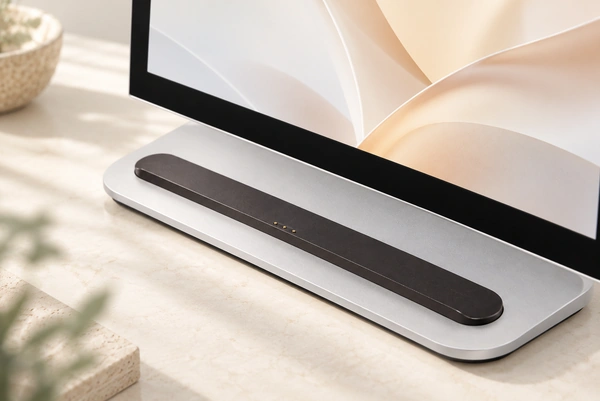
Magnetic positioning brings exposed electrical contact surfaces together.
On a compatible keyboard, the magnets help locate the tablet at its intended position. The three contacts then make the physical connection used for accessory power and communication.
This arrangement offers four useful design features:
Automatic alignment
The magnets assist placement, reducing the need to guide a plug into a small socket. The contact position and accessory geometry still need to match correctly.
Integrated power transmission
The compatible keyboard obtains its operating power from the tablet through the three-contact keyboard interface. It does not need a separate battery to power that keyboard interface.
Direct data communication
The physical contacts carry keyboard commands and, on applicable accessories, trackpad input. Communication through this compatible keyboard interface does not require Bluetooth pairing.
Fast attachment and removal
The user can attach or remove the accessory without releasing a mechanical latch. This supports convenient changes between tablet use and a keyboard-based arrangement, rather than establishing a particular mating-life rating.
The compatible stylus magnetic attachment area
Certain tablet models have a magnetic attachment area along a long enclosure edge for a compatible compatible stylus. Its location and compatibility depend on the specific tablet.
On a compatible tablet, premium wireless stylus and wireless stylus (second reference model) can use that attachment for:
Magnetic positioning
Accessory storage
Pairing with the compatible tablet, with Bluetooth enabled as instructed
Wireless charging on the compatible tablet
For premium wireless stylus or the second-generation stylus, the reference manufacturer’s instructions specify attachment to the appropriate magnetic area of a compatible tablet for pairing and charging, with the required Bluetooth setting enabled.
This is a stylus interface, distinct from the three-contact keyboard contacts. premium wireless stylus and second-generation models charge wirelessly when attached to their compatible tablet, without exposed charging pins.
Which compatible stylus models charge magnetically?
Magnetic attachment alone does not establish charging capability.
USB-C stylus attaches magnetically to a compatible tablet for storage. Pairing and charging use a USB-C cable instead, so magnetic attachment should not be interpreted as a powered connection.
The four stylus versions illustrate the distinction:
| compatible stylus model | Magnetic attachment | Pairing through magnetic attachment | Charging through magnetic attachment |
|---|---|---|---|
| Premium wireless stylus | Yes, with a compatible tablet | Yes, with a compatible tablet and Bluetooth enabled | Yes, with a compatible tablet |
| wireless stylus (second reference model) | Yes, with a compatible tablet | Yes, with a compatible tablet and Bluetooth enabled | Yes, with a compatible tablet |
| USB-C stylus | Yes, on compatible models | No | No |
| wired stylus (first reference model) | No magnetic side attachment for storage | No | No |
Scroll horizontally to view every column.
Check the reference manufacturer’s current compatibility information for the exact tablet and stylus generations before purchasing. A magnetic attachment area does not make every stylus version compatible.
Three-contact keyboard interface and compatible stylus: different interfaces
Both involve magnets, but their electrical functions and intended accessories are different.
| Feature | Three-contact keyboard interface | compatible stylus magnetic connector |
|---|---|---|
| Main accessory | Keyboard or keyboard case | compatible stylus |
| Typical location | Back or side of the tablet | Long edge on a compatible tablet |
| Visible contacts | Usually three metal contacts | No exposed wireless-charging contacts on Pro or second-generation stylus |
| Power transfer | Yes | Wireless charging for compatible Pro and second-generation models |
| Data transfer | Yes | Stylus communication uses Bluetooth; attachment assists pairing on supported models |
| Bluetooth pairing required | No for compatible keyboards | Bluetooth is used by compatible compatible stylus models |
| Main purpose | Keyboard power and communication | Storage; supported models also pair and charge when attached |
Scroll horizontally to view every column.
The three-contact keyboard interface transfers power and data through electrical contacts, with magnets assisting placement. For supported stylus models, magnetic placement enables wireless charging; stylus communication uses Bluetooth rather than the charging magnetic field carrying all data.
Designing a similar magnetic attachment experience
A custom magnetic spring-contact interface can give another device convenient attachment and removal. A typical pair uses pogo pins on one half and flat pads or matching conductive contacts on the other, together with magnets and mechanical alignment features. The compression and retention must be designed to maintain the required electrical contact.
magnetic spring-contact interface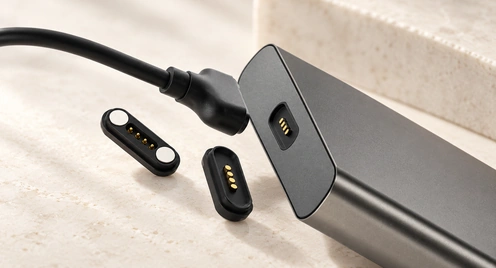
Assign contacts to power, ground, detection and data according to the circuit. A properly integrated magnetic interface can reduce the need for plug insertion and suit thin products, docks, keyboards or charging bases. Wear, thickness and ease of use remain design targets to verify, rather than automatic advantages.
Benefits and limits of magnetic spring contacts
Magnetic positioning and compliant contacts can support convenient repeated connection. Actual electrical reliability and wear life depend on the contact structure, finish, compression and environment. Consumer, medical and industrial applications each need their own operating and validation requirements.
Video material pending replacement
How magnetic spring contacts operate
The magnets assist approach and retention while the compressed pins establish conductive paths to the mating surfaces. Mechanical alignment, working height, contact travel and holding force determine whether the interface remains engaged, including in confined or blind-mating arrangements.
Five potential design benefits
Ease of use: Magnetic guidance can simplify engagement and reduce placement effort when the surrounding geometry provides proper alignment.
Repeated use: A suitable contact structure and plating system can support frequent mating; verify the required cycle life under stated loads and conditions.
Spring contactsContact compliance: Spring force can maintain contact within the specified travel. Resistance to vibration or movement depends on the complete assembly and its validation.
Spring-loaded contactsCompact packaging: Contact and housing layouts can be tailored to small devices, while preserving the necessary electrical spacing and mechanical support.
Functional allocation: Contacts can serve power, data and other signals where the pinout, ratings and communication design meet those requirements.
Potential application areas
Examples of products that may use a designed and validated magnetic spring-contact interface include:
Consumer electronics: Phones, wearables and other portable products where compact packaging and convenient attachment are useful.
Medical equipment: Diagnostic and monitoring devices with repeated attachment requirements, subject to their device-specific safety, cleaning and reliability validation.
Industrial automation: Robots, machinery and similar equipment needing repeatable quick connection under specified mechanical and environmental loads.
Electric vehicles: Suitable low-voltage auxiliary, charging-control or data interfaces. This example does not establish suitability for a vehicle’s high-voltage traction charging connection.
electric vehicles
Benefits and design limitations
| Aspect | Advantages | Limitations |
|---|---|---|
| Ease of Use | Magnetic guidance can support quick engagement | Retention and release force must suit the assembly |
| Durability | A finish and contact design can be selected for repeated use | Wear still limits life; validate the required mating cycles |
| Compact Design | Can be arranged for a compact product envelope | Available current capacity depends on the contact and thermal design |
| Versatility | Power, data and signals are possible with a suitable electrical design | Cost depends on construction, materials, tooling and volume |
Scroll horizontally to view every column.
Design perspective
Magnetic spring contacts offer one way to combine convenient attachment with a compact electrical interface. Their usefulness depends on matching the mechanism to the product’s actual requirements.
Design note: A custom magnetic spring-contact solution can provide an attachment experience similar to a three-contact keyboard interface accessory. That does not reproduce the reference manufacturer’s proprietary protocol, establish tablet compatibility or provide compatible stylus wireless charging. Specify and validate the mechanical and electrical interface for your own device.
MagtorFrequently asked questions
1. What does the tablet three-contact keyboard interface do?
It connects a compatible keyboard accessory through magnetic positioning and electrical contacts. The interface supplies power and carries data, so that accessory does not need a separate charging cable or conventional Bluetooth pairing.
2. Are the visible tablet three-contact keyboard interface contacts pogo pins?
The visible contacts are flat pads, rather than protruding pogo pins. A matching accessory may use spring-loaded contacts against those pads. That is a similar contact principle, but it does not establish the internal construction of every accessory from that manufacturer.
3. How does a magnetic pogo-pin connector operate?
Magnets assist engagement and hold the mating halves together. Within their specified compression range, the spring contacts touch the mating surfaces to form the designed charging, power, detection or communication paths.
4. Can spring contacts carry power and data together?
Yes, with suitable allocation of power, ground, signal and detection contacts. Current limits, contact resistance, spacing and communication requirements must all fit the intended device and cable.
5. How does a custom magnetic connector differ from three-contact keyboard interface?
Three-contact keyboard interface is the reference manufacturer’s proprietary interface for particular compatible tablets and accessories. A custom magnetic spring-contact interface is a separate hardware design whose contact count, dimensions, force, current requirements, mounting and sealing can be tailored and validated for another product.
6. How does it compare with a conventional plug?
Magnetic engagement can avoid conventional plug insertion and permit controlled breakaway where the design supports it. Wear and release performance require validation. A USB-C connector uses a standardized form, but data speed, power and device compatibility still depend on the actual implementation and cable.
Conclusion
The tablet three-contact keyboard interface illustrates how magnetic positioning and conductive contacts can make a compatible keyboard easy to attach and remove, while carrying power and data through the contact interface.
For another product, spring contacts, mating pads and magnets can form a separately designed interface with a similar attachment experience. Contact count, size, current and signal requirements, magnetic force, mounting and sealing must be specified for that device. Customizability does not imply compatibility with the reference manufacturer’s proprietary three-contact keyboard interface.
For the three-contact keyboard interface and a generic magnetic spring-contact interface, magnets assist positioning and retention while contacts carry electricity. This comparison does not describe every compatible stylus charging method. Share your own device’s requirements with Magtor to discuss a suitable magnetic connection design.
Contact Magtor to discuss your magnetic-interface requirements
Contact Magtor to discuss your magnetic-interface requirementsRelated design guides